
Match every row to CRM accounts by normalised domain, drop owned accounts and open opportunities, then check do-not-contact again at write time and send time.
Key takeaways
- As of September 27, 2026, HubSpot deduplicates contacts on the email address and companies on the company domain. It checks only primary domains when a company is created, and secondary domains only on import.
- Salesforce allows up to five active duplicate rules per object, each with up to three matching rules, according to its help documentation read on September 27, 2026.
- HubSpot's duplicates tool shows up to 10,000 duplicate pairs on Professional and Enterprise plans, and up to 100,000 with Data Hub Enterprise, per its knowledge base read on September 27, 2026.
- In Validity's 2025 survey of 602 CRM users, 76 percent said less than half of their organisation's CRM data is accurate and complete.
- Google requires senders of 5,000 or more messages a day to personal Gmail accounts to process unsubscribe requests within two days, which sets the floor for how fast a do-not-contact list must propagate.
The costly duplicates in a prospect list are companies the CRM already knows under another name, another domain or another owner. Exact copies of a row are the easy part.
Why do prospect lists still reach accounts the CRM already owns?
Because the CRM matches on exact keys and the list arrives with different ones. A new file says acme.io, the CRM holds acme.com. The file says Acme Holdings Ltd, the account is called Acme. Native deduplication sees two companies, and a rep sequences a prospect whose colleague is in a live negotiation.
The vendors document this behaviour plainly. HubSpot's deduplication article states that contacts are deduplicated by email and companies by domain name. A company created by hand is checked against primary domains only, and secondary domains count only on import. A contact who writes from a personal address, or a subsidiary on a domain nobody recorded, passes straight through.
The underlying data does not help. In Validity's State of CRM Data Management in 2025, a survey of 602 CRM users by a data-quality software vendor, 76 percent said less than half of their CRM data is accurate and complete. The same survey found 37 percent had lost revenue as a direct result of poor data quality. A matching step that trusts the CRM as the single truth inherits those gaps.
The receipts all point one way. The collision happens because nobody wrote down what "same company" means before the list was built.
Which matching rules catch the same company under another name?
Match on a normalised domain first, then on a normalised company name with location, then on a parent or alias table you maintain yourself. Email alone catches only exact contact repeats. Domain alone misses subsidiaries and rebrands. Each rule below catches a case the one above it misses.
Salesforce builds the name-plus-location rule into its standard account matching rule, which needs the account name and either the city or the postal code for accurate matches. Its matching methods documentation describes fuzzy methods that compare approximate strings rather than exact values.
The domain alias table is the rule most teams skip. It is also the one that stops two reps from writing to the same company under two brands.
Stop two reps emailing the same company: settle ownership first
Two reps email the same company when ownership lives at the contact level and nobody checks the account. The fix starts with a written rule. Every account has one owner, every contact inherits the account owner, and a new row that matches an owned account is routed to that owner or removed.
Write the ownership rule in one sentence your reps can repeat. For example, the account owner owns every contact at the account and its subsidiaries for as long as the account has activity in the last 90 days. The number of days is your choice. The point is that it is written.
Then decide what happens to a matched row. There are only three sensible outcomes. The row goes to the account owner as a suggestion. The row is dropped because the account is in an active cycle. Or the row goes to the requesting rep because the account has been dormant past the threshold.
The parent account hierarchy from the table matters most here. A rep who prospects a subsidiary is emailing a company another rep already sells to, even when the domains differ.
Keep open opportunities out of cold sequences at build time
Exclude any account with an open opportunity before the list is enriched, not after. Enrichment costs money per row, and a row you will never send is a row you should not pay to verify. The build-time exclusion runs against the account, the parent and every alias domain.
The check itself is a join. Export open opportunities with their account ID, account domain and every alias domain. Normalise both sides the same way. Remove every prospect row whose root domain or matched account ID appears in that export.
Recent losses deserve their own window. A deal closed-lost last month is an account where a cold email reads as if nobody talked to each other. Most teams hold closed-lost accounts out for a quarter and closed-won accounts out of cold prospecting for good.
Customers need the same treatment. An existing customer who receives a cold pitch for a product they already pay for sees a vendor that does not know them.
If you build the list from a description rather than a vendor export, the same join applies at the end. Our guide to building a list from a description covers the build itself.
Enforce a do-not-contact list across a sales team
Treat do-not-contact as a list that is checked three times, once when the list is built, once when the message is written and once when it is sent. A single check at build time fails because the objection can arrive after the list was made, and a sequence can run for weeks.
- Normalise domains and names
- Match to CRM accounts
- Drop owned and open deals
- Suppress do-not-contact
- Recheck before each send
At build time, remove every row whose email, domain or account appears on the suppression list. Suppress at the domain level when a company has asked not to be contacted, not only the individual address.
At write time, the check belongs in whatever the rep uses to draft. A rep who adds a contact manually bypasses every build-time filter. The sequencing tool or CRM should refuse to enrol a suppressed address.
At send time, the sequencer checks the suppression list again before each step. Google's sender guidelines FAQ asks senders of 5,000 or more messages a day to personal Gmail accounts to honour one-click unsubscribes within two days. Treat that as the ceiling on how long a new objection can take to reach every mailbox your team sends from.
Data-protection law gives the prospect a right to object to direct marketing. Once someone uses it, a second email from a different rep is the same breach as the first.
What do HubSpot and Salesforce do natively, and where do they stop?
Both CRMs catch exact duplicates on records inside the CRM. Neither was built to compare an outside prospect file against open opportunities and suppression before a rep sees it. The native tools keep the database clean, and the pre-send gate has to be built on top of them.
Salesforce limits how much logic you can stack. Its duplicate rules documentation allows up to five active duplicate rules per object and up to three matching rules in each. That is enough for accounts, contacts and leads, but rules fire on record creation and edit. A CSV that never enters the CRM is never checked.
HubSpot caps how much it will show. Its duplicates manager displays up to 10,000 duplicate pairs on Professional and Enterprise subscriptions. Data Hub Professional raises that to 30,000 and Data Hub Enterprise to 100,000. On a large database, the backlog can exceed what the review screen lists.
In practice, run the matching rules from the table on the prospect file before import, and let the CRM's own duplicate rules catch whatever slips through. Then verify the addresses that survive, as covered in our guide to verifying a B2B email list.
How much does skipping the check cost?
The visible cost is the enrichment spent on rows you then throw away. The invisible one is a lost deal. Validity's survey found 37 percent of CRM users had lost revenue to poor data, and a cold email landing on a live opportunity is one of the most direct ways that happens.
Take an illustrative file of 2,000 prospects. If 10 percent match an owned account or an open deal, that is 200 rows. Verified at a typical per-row price, those 200 rows are spent on contacts no rep should write to. This is our own arithmetic, and the share will differ on your file.
The price per row varies widely by vendor. Our breakdown of prospecting data cost for a sales team sets out what a usable contact costs on the main plans. Running exclusions before enrichment is the cheapest saving on that line.
Where Freelvy fits
Freelvy is our product, an AI sales platform used the way you use ChatGPT or Claude. You describe the customer you want in one prompt. Freelvy searches 40+ live sources at query time (maps, official company registries, job boards, storefronts, ad libraries) instead of filtering a stored database.
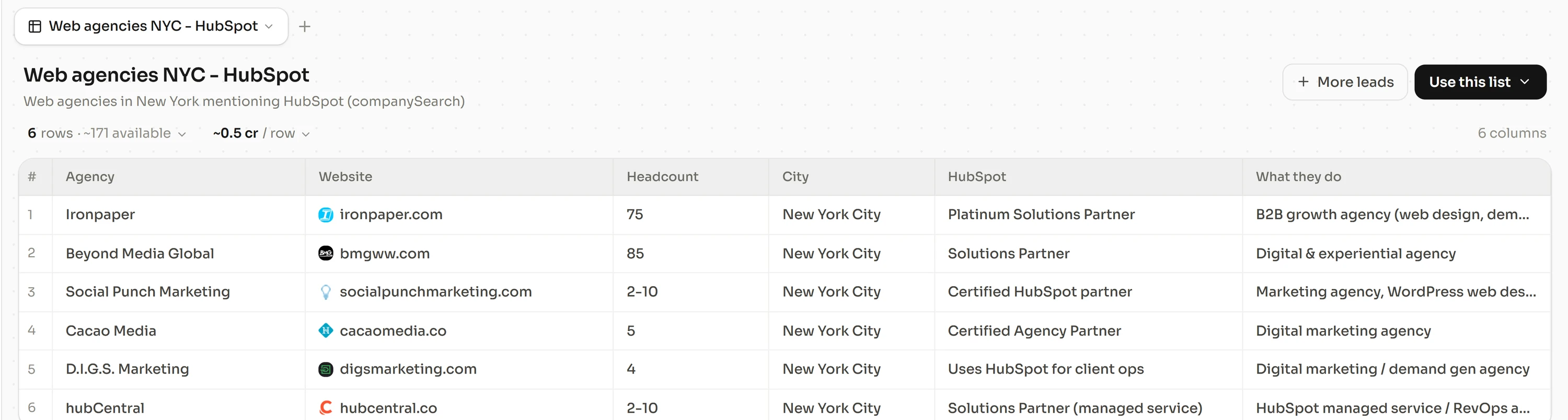
It then enriches every row with verified contacts through provider waterfalls, 23 for email and 13 for phone. The waterfalls find and verify more than 92% of emails and find more than 90% of phone numbers. A row that fails verification is never delivered and never billed. Search, enrichment and sequencing sit in one thread, and the sequencer sends from your own Google or Microsoft mailbox.
For RevOps teams, that shortens the path between the list and the send, which leaves fewer hand-offs where the exclusion checks can be skipped. An existing file can go through the same waterfalls with CSV enrichment. Plans start at €49 a month for 1,500 credits, with unlimited team members and no lock-in. Free 7-day trial, no credit card, at freelvy.com.
How we verified this
HubSpot's knowledge base articles on deduplication and on managing duplicate records, Salesforce's help pages on duplicate rules, the standard account matching rule and matching methods, Google's email sender guidelines FAQ and Validity's report page were read on September 27, 2026. The 2,000-row illustration is our own arithmetic.
FAQ
How do I dedupe a prospect list against my CRM?
Export CRM accounts with every domain they use, open opportunities and the suppression list. Normalise domains and company names on both sides. Match the prospect file on root domain, then on alias domains, then on name plus location. Remove matched rows or route them to the account owner, then verify what is left.
How do I stop two reps from emailing the same company?
Set ownership at the account level and roll subsidiaries up to their parent. A new prospect row that matches an owned account goes to that owner or is removed. Write the rule in one sentence, including how many days of inactivity release an account, so every rep applies the same test.
Should I match on company name or domain?
Domain first, because it is more stable than a name. HubSpot checks only the primary domain when a company is created, so keep a table of alias domains yourself. Use company name with city or postal code as a second pass, which is how Salesforce's standard account matching rule approaches names.
How do I dedupe a marketing list against CRM records?
Apply the same rules as a sales list, with one addition. Check each row against existing customers and open opportunities, not only against contacts. A marketing campaign reaching an account in late-stage negotiation causes the same confusion as a cold email, even when the message is an event invitation.
Where should the do-not-contact check run?
At three points. When the list is built, when a rep adds or enrols a contact, and before each send. Suppress at the domain level when a company objects. Google expects bulk senders to honour unsubscribes within two days, which is a sensible ceiling for any internal suppression list.
Does HubSpot or Salesforce do this automatically?
Only for records already in the CRM. Salesforce's duplicate rules fire when a record is created or edited, with up to five active rules per object. HubSpot deduplicates on email and company domain. Neither compares an outside file against open opportunities before a rep uses it, so that check needs its own step.
How long should closed-lost accounts stay excluded?
There is no platform rule, so choose a window and write it down. Many teams hold closed-lost accounts out of cold outreach for about a quarter, then release them to the owner first. Existing customers are usually excluded from cold prospecting permanently and handled by their account manager instead.
Sources and methodology
All pages below were read on September 27, 2026. Figures are attributed in the text to the pages that published them. The 2,000-row illustration is our own calculation.
- knowledge.hubspot.com, records deduplication of records
- knowledge.hubspot.com, records manage duplicate records
- help.salesforce.com, s articleView
- help.salesforce.com, s articleView
- help.salesforce.com, s articleView
- support.google.com, answer 14229414
- validity.com, resource center the state of crm data management in 2025