
Count your market in five steps: registered companies, active companies, accounts that fit, contacts per account, and contacts you can actually reach.
Key takeaways
- Lusha's 2026 contact change report counts about 13,600 B2B contacts changing companies per working day in the first half of 2026, across its own database.
- Instantly's Cold Email Benchmark Report 2026 puts the average cold email reply rate at 3.43%.
- Salesforce's State of Sales 2026, a survey of 4,050 sales professionals, found that sellers spend 40% of their time actively selling.
A RevOps or Sales Ops owner is often asked to sign a data plan before anyone knows how big the market is. The vendor quotes a credit volume. The sales plan assumes a number of accounts. Nobody has checked either. This guide gives a counting method you can run in a day, before any credit is committed.
What does it mean to count your market?
It means turning your ideal customer profile into a number you can check. You start from every company that could match, remove the ones that do not operate or do not fit, then count the people you would contact and how many of them you can reach. Each step has a source and a loss rate.
The output is three numbers, not one. The first is accounts that fit. The second is contacts you plan to reach. The third is the credits those contacts will cost. A data plan should be sized on the third, and the sales plan on the first.
Every step needs a written rule. Without one, two people counting the same segment will produce two numbers, and the plan will be argued instead of corrected.
How do you write the segment so it can be counted?
Write each criterion as something a source can confirm. "Mid-sized software companies" cannot be counted. "Software companies with 20 to 200 employees, registered in your territory, with at least one open sales role" can. Each condition maps to a source type you can query.
Keep to four or five criteria. More than that and the count collapses to a list too short to be worth a plan. Fewer and the count includes companies nobody would sell to.
Separate fit criteria from timing criteria. Size, industry and business model decide whether a company belongs in the market at all. A hiring wave or a new location decides when to write. Count the market on fit, then count the timing signal as a share of it.
If your brief does not fit a database filter at all, start from a plain description instead. Our guide on building a list from a description shows how to turn that brief into criteria.
Where does the first count come from?
From the official company registry of your territory, or from an industry list where no registry is usable. The registry gives every legal entity with its activity code, its registration date and its status. That is the widest honest starting number.
Activity codes are blunt. A software company may be registered under consulting, and a holding company may carry the code of its subsidiary. Expect the registry count to include companies that do not really match, and some that match under another code.
Do not stop at the registry. Maps listings show which companies receive visitors. Job boards show which ones are hiring. Storefronts and ad libraries show which ones sell online or advertise. Each source confirms that a company operates, which is the next step.
How do you remove companies that do not operate?
Check for a sign of activity in the last twelve months. A live website, an open job post, a recent review, an active ad or a filing in the registry each counts. A company with none of these is not a prospect, whatever its legal status says.
This step often removes a large share of the gross count. Holding entities, dormant companies and one-person shells sit in every registry. They will never answer an email, and paying to enrich them is pure waste.
Do this on a random sample first. Take 50 companies from the gross count and check each by hand. The share that shows activity gives you a ratio you can apply to the whole count while the full check runs.
How many contacts should you count per account?
Count the people you will actually write to, usually two or three per account. A B2B purchase is rarely decided by one person, and the people involved often sit in different functions. You will not reach all of them, but one contact per account is rarely enough.
Write the roles down. "Head of sales and the founder" for a small company, "head of sales, sales ops lead and the CFO" for a larger one. The roles decide which accounts have no visible contact, and those drop out of the count.
People also move. Lusha's 2026 contact change report counts about 13,600 B2B contacts changing companies per working day in the first half of 2026, across its own database. A contact count is a snapshot. Plan a refresh before the list is sequenced, not a year later.
How do you know how many contacts you can reach?
Test it on a sample before you buy. Take 50 accounts that fit, find the target contacts and run them through enrichment. The share that comes back with a verified email, and the share with a phone number found, are your reach rates. Apply them to the full count.
Run the test on the vendor you plan to buy, and on accounts you already know. Our guide on testing a data vendor before you sign gives the full protocol and the measures to record.
Do not use a vendor's headline coverage figure in your plan. It describes their whole database, not your segment. Your own sample is the only number that applies.
- Count registered companies
- Keep the active ones
- Keep the ones that fit
- Count contacts per account
- Test reach on a sample
How do you turn the count into credits and a sales plan?
Multiply reachable contacts by the credits each one costs, then add a refresh. That gives the data plan. Then take accounts that fit, the share in market each quarter and your reply rate, and you get the sales plan. Both now rest on numbers you checked. Once sends start, our guide on which ICP segment is producing pipeline shows how to compare segments on results.
Timing matters for the sales side. Only a small share of the accounts that fit are buying in any given quarter. Measure that share on your own pipeline, by dividing the accounts that opened a buying process last quarter by the accounts that fit. Apply it to the count, and you have the number of accounts to expect this quarter. If that share comes from an intent provider, read how to verify intent data first.
Reply rates set the volume. Instantly's Cold Email Benchmark Report 2026 puts the average cold email reply rate at 3.43%. Divide the replies you need by that rate, and you have the number of contacts to sequence. Compare it with your reachable count before signing.
Time is the last constraint. Salesforce's State of Sales 2026 found that sellers spend 40% of their time actively selling. A plan that assumes reps also build and clean the lists is a plan that will slip. Our breakdown of what prospecting data costs for a whole sales team shows how to price the credits per seat and per contact.
A counting worksheet you can copy
Paste this into a spreadsheet or a planning doc. Fill one column per segment. The numbers in brackets are an illustration of the arithmetic, not a benchmark.
MARKET COUNT, segment: [name]          date: [date]   owner: [name]

Criteria (fit):     [industry] / [size range] / [territory] / [model]
Criteria (timing):  [signal, e.g. open sales role in last 60 days]

1. Registered companies        [12,000]   source: [registry, extract date]
2. Active (sample 50: [33] active = [66%])     -> [7,920]
3. Fit (sample 50: [18] fit = [36%])           -> [2,851]
4. Contacts per account        [2]            -> [5,702] target contacts
5. Reach (sample 50 accounts):
     verified email rate       [x%]           -> [n] reachable by email
     phone found rate          [y%]           -> [n] reachable by phone
6. Credits needed              [n emails x credits] + [n phones x credits]
7. Refresh before sequencing   [date]
8. In market this quarter      [accounts that fit x your in-market share] = [n]
9. Contacts to sequence        [replies needed] / [reply rate] = [n]

Decision: plan size [credits], sales target [accounts], review date [date]
Keep the samples and the rules with the sheet. When someone asks in week three why the number changed, the answer is in the file, not in anybody's memory.
Where Freelvy fits
Freelvy is our product, an AI sales platform used the way you use ChatGPT or Claude. You describe the segment in one prompt, and Freelvy searches 60+ live data sources at query time, including maps, official company registries, job boards, storefronts and ad libraries, instead of filtering a stored database. That is the same set of source types the counting method uses.
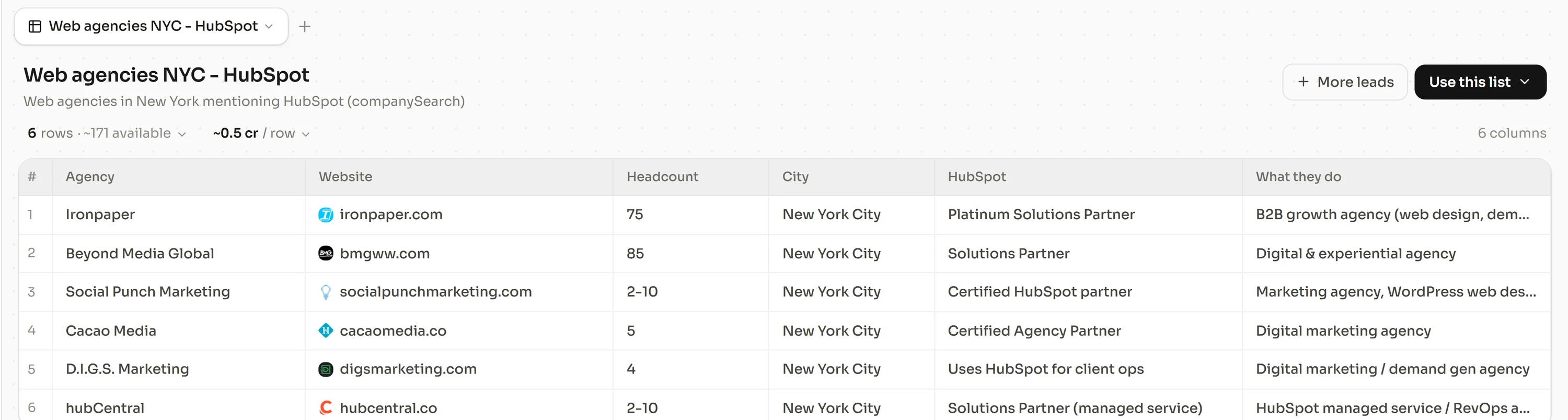
A prompt for the sample step can read like this. "Find software companies with 20 to 200 employees in my region that posted a sales role in the last 60 days. For each, return the head of sales and the founder, with a verified email." The result is the sample you need for steps 3 to 5.
Every row is enriched through cascades of 24 email providers and 15 phone providers, which find and verify more than 92% of emails and find more than 90% of phone numbers. Freelvy then writes and sequences the outreach in the same thread.
Pricing is per seat, billed monthly, with no lock-in. Starter costs €99 per seat a month with 2,200 credits per seat, and Pro €199 with 4,500. A verified email costs 3 credits and a phone number found costs 15. An email that is not found costs nothing. Sending accounts for email and LinkedIn are included per seat, and the sequencer is unlimited.
Free 7-day trial, no credit card, at freelvy.com.
Freelvy isn't for teams that would rather pay one tool for the data, another for enrichment and a third for sending.
FAQ
How do I count how many companies match my ICP?
Start from the official company registry or an industry list for your territory, keep only companies with a sign of activity in the last twelve months, then apply your size and model criteria. Check each ratio on a random sample of 50 before applying it to the whole count.
Should I size a data plan on accounts or on contacts?
On reachable contacts. Accounts that fit decide the sales plan, but credits are spent per contact found and verified. Multiply accounts by the contacts you plan per account, apply the reach rate from your own sample, then add a refresh before sequencing.
How many contacts per account should I plan for?
Two or three is a common working number for outbound. A B2B purchase usually involves several people across functions, so one contact per account usually leaves the deal single-threaded.
What share of my market is ready to buy now?
No single figure applies to every category. Measure it on your own pipeline, by dividing the accounts that opened a buying process last quarter by the accounts that fit. Use that share in the plan and check it again each quarter.
Can I trust a vendor's coverage figure for my count?
Not on its own. A headline coverage figure describes the vendor's whole database, not your segment. Run the vendor on 50 accounts you already know and measure the verified email rate and the phone found rate yourself.
How often should a market count be refreshed?
Before each sequencing wave, and at least every quarter. Lusha's 2026 report counts about 13,600 B2B contacts changing companies per working day in its database, so a contact count ages within weeks. Company counts move more slowly.
Sources and methodology
All pages below were read on November 13, 2026. Lusha, Instantly and Salesforce sell sales software; their figures describe their own databases, customers and surveys. The method, the worksheet and its illustrative numbers are our own work.
- lusha.com, blog, B2B contact change report, 2026
- instantly.ai, Cold Email Benchmark Report 2026
- salesforce.com, State of Sales report announcement, 2026