
Take the owner's name from the official company register, confirm it on the website or maps listing, then build and verify the work address before sending.
Key takeaways
- A contact form is read by whoever answers the front desk, so a sales message sent through it rarely reaches the person who decides.
- The official company register names the directors or legal representatives of a company, which makes it the most reliable public source for the owner's name.
- BounceZero's Inbox Infrastructure Report 2026 found that 20.0% of 239,431 domains accepted mail for a made-up address in August 2026, so a guessed address on those domains cannot be confirmed by a server check.
- In BounceZero's 2026 analysis of 7.8 million addresses, 22.7% were invalid and 3.1% were role addresses such as info@.
- Google's sender guidelines set a spam complaint ceiling of 0.3%, and a sequence sent to generic inboxes gets reported faster than one sent to the right person.
A founder who sells to small companies hits this wall every week. The account is a perfect fit, the website is live, and the only way in is a form. This guide shows how to reach the owner instead, using public sources and a verification step that protects your domain.
Which situation are you in?
Four situations cover almost every small company. The site shows only a form, only a generic address, a named owner without an address, or several people who could decide. Each one needs a different first move, so find yours in the table before you start.
The method below works in that order. Find the name, build the address, verify it, then write one short message.
Why does the contact form go nowhere?
A form is built for customers, not suppliers. It lands in a shared inbox or a front-desk queue, where a sales message is filtered out first. You also lose the thread. There is no reply address you control, no follow-up, and no way to tell whether anyone read it.
The generic inbox has the same problem in a different shape. BounceZero's 2026 analysis of 7.8 million addresses, verified between November 2025 and June 2026, classed 3.1% as role addresses such as info@, support@ and admin@. It flags them as carrying a high complaint risk. Several people read them, and any of them can press the spam button.
That matters beyond one account. Google's email sender guidelines ask bulk senders to keep the spam complaint rate below 0.3%. A founder usually sends from the same domain that carries their invoices, so a few complaints from generic inboxes cost more than one lost lead.
How do you find the owner's name?
Start with the official company register for the place where the company is incorporated. It lists the directors or legal representatives, the registration date and the declared activity. Then confirm the name in a second source, such as the about page, the maps listing or a recent job posting.
The register is the anchor because it is a legal record. A website can be years old, and a social profile can belong to someone who left. A director listed on the register is, at minimum, a person the company has declared to the authorities.
Second sources catch the cases the register misses. A small company often has a general manager who runs the day-to-day business but is not a director. Look in three places:
- the owner's replies to reviews on the maps listing, which are often signed with a first name;
- job postings, which may say who the new hire reports to;
- the about or team page, which names the founder in most service businesses.
When two sources agree on a name and a role, move on. When they disagree, the person who replies to reviews or signs the job posting is usually the one running the business today.
How do you work out the address?
Use the company's own domain, the one on the website, never a free mail domain. If the site or any public document shows one named address, copy its pattern. Otherwise test the common patterns, such as first name, first.last and first initial plus last name, and let verification decide.
Check the domain first. A domain with no mail server record cannot receive email, so no pattern will work. A small company sometimes uses a different domain for email than for its website. A signature in a published document or an old press release usually reveals it.
Keep each guess as a candidate, not an answer. A list of three possible addresses for one owner is normal. Sending to all three is not, because two will bounce and the third may look like spam.
Our guide on how to verify a B2B email list explains each check in detail, from syntax to the server conversation.
How do you verify the address before sending?
Run four checks in order: syntax, mail server, mailbox and catch-all. A valid result means the server confirmed that mailbox. An unknown result usually means a catch-all domain, which accepts every address and confirms nothing. Send only to valid results from the domain you care about.
Catch-all domains are common. BounceZero's Inbox Infrastructure Report 2026 probed 239,431 domains in August 2026 and found that 20.0% accepted mail for an address that did not exist. The rate was 33.2% on Google Workspace domains and 17.6% on Microsoft 365 domains.
Invalid addresses are just as common in lists that were never checked. In BounceZero's analysis of 7.8 million addresses, 22.7% were invalid and 17.4% were catch-all or risky. Both figures come from an email validation vendor's own data, so read them as orders of magnitude.
- Find your situation
- Read the company register
- Confirm in a second source
- Build the work address
- Verify before sending
- Send one short message
For an unknown result, choose between three moves. Find a second public address on the domain to confirm the pattern. Send from a secondary domain so a bounce does not touch your main one. Or skip the email and call the number on the maps listing.
What should you do with info@?
Use it once, as a routing question, and never put it in a sequence. A short note asking who handles a named topic often gets forwarded to the owner, with an introduction attached. A sequence of four follow-ups to the same shared inbox gets reported.
Keep the routing note to two sentences. Name the topic, ask who looks after it, and thank them. Do not pitch in it. The person who reads info@ is not the buyer, and a pitch gives them a reason to delete.
If the reply names someone, you now have a name from the company itself. Verify the address as above before writing to that person.
What should the first message to the owner say?
One reason to write, tied to something true about their business, and one question. The owner did not ask to hear from you, so the message must prove in its first line that it was written for them. Leave out how you found the address.
A dated, checkable fact works best: a second location, a new service on the website, a job posting for a role you can help with. Keep it under 90 words and send it from a mailbox with your real name.
The address you found is professional data. Write only to work addresses, honour every opt-out at once, and follow the data protection rules that apply where you sell. Our cold email deliverability checklist covers the sending side.
A prompt you can copy
Done by hand, the method above takes several minutes per account. Written as a brief, it can run on a whole segment at once. Here it is as a template; replace the bracketed parts with your own market.
Find independent [type of business] in [your region] with 2 to 20 employees
whose website lists only a contact form or a generic address (info@, contact@).
For each company:
- give the owner or managing director's name from the official company register,
  confirmed by the website, the maps listing or a recent job posting;
- give their work email on the company domain, verified, and drop the row
  if it cannot be verified;
- add one dated fact about the company from the last 90 days
  (new location, new service, job posting, review reply).
Exclude companies already in my CRM.
The last line matters as much as the first. A list that ignores your CRM sends the same owner two messages from two reps.
Where Freelvy fits
Freelvy is our product, an AI sales platform used the way you use ChatGPT or Claude. You paste a brief like the one above, and Freelvy searches 40+ live sources at query time, including maps, official company registries, job boards, storefronts and ad libraries, instead of filtering a stored database.
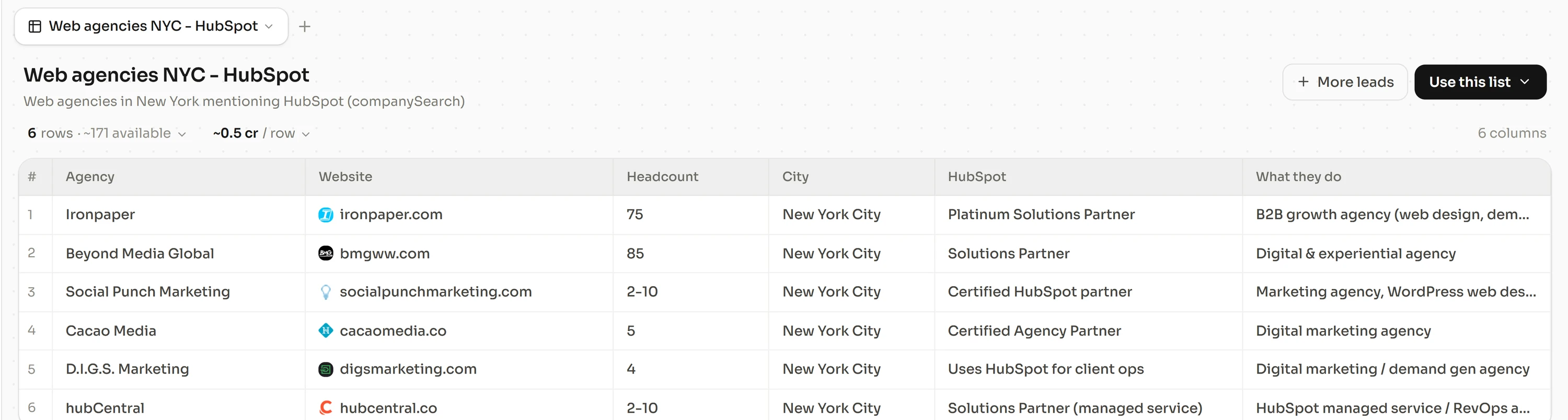
Every row goes through email finding and verification in a cascade of 18 email providers, and 12 for phone numbers. The cascades find and verify more than 92% of emails and find more than 90% of phone numbers. An email lookup that finds nothing is never billed. Freelvy then writes and sequences the first message in the same thread.
Pricing is per seat, billed monthly, with no lock-in. Starter costs €99 per seat a month with 2,200 credits, and a verified email costs 3 credits.
Free 7-day trial, no credit card, at freelvy.com.
Freelvy isn't for teams that would rather pay one tool for the data, another for enrichment and a third for sending.
How we verified this
On October 19, 2026, we read BounceZero's Inbox Infrastructure Report 2026, BounceZero's State of Email Validation in 2026, Google's email sender guidelines and Instantly's Cold Email Benchmark Report 2026. The situation table, the method and the prompt are our own work.
FAQ
How do I find the owner of a small company?
Read the official company register where the company is incorporated. It lists directors or legal representatives. Then confirm the name in a second source, such as the about page, signed replies to reviews on the maps listing, or a job posting that says who the hire reports to. Two agreeing sources are enough.
Is it acceptable to email a business owner directly?
A work address used for a relevant business offer is standard B2B practice in most markets, provided you follow the data protection rules that apply where you sell. Write only to professional addresses, explain why you are writing, and honour any request to stop at once.
What if the company uses a catch-all domain?
A catch-all domain accepts every address, so a server check returns unknown rather than valid. Confirm the pattern with a second published address, send from a secondary domain, or call the number on the maps listing. BounceZero found catch-all behaviour on 20.0% of the domains it probed in August 2026.
Should I send my pitch to info@?
No. Send one short routing question asking who handles the topic, and never add a generic inbox to a sequence. BounceZero classes role addresses as high complaint risk, because several people read them and any of them can report the message.
How many address guesses should I send?
One, and only once it has been verified. Build the candidates from the company's naming pattern, verify them, and send to the single address the mail server confirms. Sending to every guess produces bounces, and bounces damage the domain you send from.
How long does this take per company?
Several minutes by hand, most of them spent reading the register and confirming the name. Batched as a brief, the same steps run on a full segment. Instantly's 2026 benchmark puts the average cold email reply rate at 3.43%, so the time is worth spending only on accounts that fit.
Sources and methodology
All pages below were read on October 19, 2026. BounceZero is an email validation vendor, and its figures describe its own customers' data.
- bouncezero.io, The Inbox Infrastructure Report 2026
- bouncezero.io, The State of Email Validation in 2026
- support.google.com, Email sender guidelines
- instantly.ai, Cold Email Benchmark Report 2026