
When every rep's email lands in spam, the problem sits in the shared domain's reputation. Pause sending and repair causes in order, bounces first.
Key takeaways
- Google counts every message sent from the same primary domain, subdomains included, toward its bulk sender threshold of about 5,000 messages a day to personal Gmail accounts, per its sender guidelines FAQ as of October 4, 2026.
- Google asks senders to keep the spam rate shown in Postmaster Tools below 0.10 percent and never to reach 0.30 percent, according to its email sender guidelines as of October 4, 2026.
- A bulk sender above 0.30 percent loses access to Gmail's delivery mitigation until its spam rate stays below that line for seven consecutive days, per Google's FAQ as of October 4, 2026.
- Microsoft has rejected non-compliant mail from domains sending more than 5,000 messages a day to Outlook.com, Hotmail and Live addresses since May 5, 2025, with the error 550 5.7.515.
- Amazon SES documentation places a sending account under review at a 5 percent bounce rate and may pause it at 10 percent, as of October 4, 2026.
A single rep in spam is a mailbox problem. A whole team in spam is a domain problem, and it has to be repaired as one.
Why is all our cold email going to spam at once?
Because the mailbox providers judge the domain, not the rep. Every mailbox on the same domain shares one reputation. When one list bounces or one sequence draws complaints, the damage lands on the domain, and every rep who sends from it inherits the result the next morning.
Google says so in its own counting rule. Its sender guidelines FAQ counts all messages sent from the same primary domain toward the bulk sender threshold, so mail from a subdomain adds to the total of the main one. Ten reps at 50 messages a day each add up to one domain sending 500 a day.
Google's FAQ also states that a domain classified as a bulk sender keeps that status permanently. A team that once crossed the line during a big launch is held to the bulk sender rules from then on.
How do you tell which cause it is?
Start from the symptom you can see and match it to a cause you can check in under an hour. Most team-wide spam placement traces back to one of a handful of causes. The table below links each symptom to the number that confirms it and the fix that addresses it.
The first row that matches usually explains the others, because a complaint spike and a bounce spike often come from the same rushed list.
Should you stop sending while you diagnose?
Yes, pause cold sending on the affected domain the day you notice it. Every message sent into a damaged reputation adds more negative signal. A pause costs a few days of pipeline. Sending through the problem can cost the domain for a quarter, and invoices or password resets on that domain suffer with it.
Pause the cold sequences, not everything. Replies to prospects who already answered can continue, and so can transactional mail, because those recipients expect them. Engagement from people who want your mail is the signal you need more of.
Freeze list uploads at the same time. Nobody launches a new campaign until the cause is known.
Then pull the numbers for the last 30 days. You need the bounce rate by list and the spam rate per domain. Add the daily send total per domain next to them.
How do unverified rows put every mailbox at risk?
One rep importing an unverified file can push the whole domain's bounce rate over the line. Hard bounces tell providers the sender does not know who it is writing to. The damage is shared, so a rep who never touched the bad list still lands in spam the following week.
Sending platforms publish their own limits, and they show how seriously bounces are read. Amazon SES documentation, as of October 4, 2026, places an account under review at a 5 percent bounce rate and may pause sending at 10 percent. Those are a sending platform's account rules, not a mailbox provider's filter, and filters typically react well before them.
The fix is to verify every list before any mailbox touches it. That means every list, from every rep, including the "quick" one someone exported on a Friday. Our guide to verifying a B2B email list covers the method.
After verification, add every hard bounce to one suppression list that every mailbox on the team reads. An address that bounced for one rep must never reach the next rep's sequence.
What spam complaint rate is too high for a sales team?
Google's line is 0.10 percent, with 0.30 percent as the point where problems become policy. Its email sender guidelines ask senders to stay below 0.10 percent in Postmaster Tools and never reach 0.30 percent. Yahoo's Sender Hub, as of October 4, 2026, also asks senders to keep complaints below 0.3 percent.
The team-level arithmetic is tight. Take six mailboxes sending 40 messages a day each, or 240 a day on one domain. At 0.30 percent, that is under one complaint a day. This is our own illustration, and Postmaster Tools only measures mail to personal Gmail accounts, but it shows how few unhappy recipients it takes.
Crossing the line has a cost beyond placement. Google's FAQ says a bulk sender above 0.30 percent becomes ineligible for mitigation until the rate holds below 0.30 percent for seven consecutive days.
Complaints at team level usually come from overlap. Two reps write to the same buyer, or one prospect gets three sequences in a week. Assign one owner per account before restarting.
How does sending from several mailboxes on one domain add up?
The providers add up the volume of every mailbox on the domain. Ten reps who each send a reasonable amount can still look like one sudden broadcaster. Spikes usually come from launches that start on the same morning, or from a new rep switched on at full volume.
Microsoft's rules for Outlook.com, Hotmail and Live addresses apply to domains sending more than 5,000 messages a day, and since May 5, 2025 non-compliant mail is rejected with 550 5.7.515. Google applies its bulk sender rules from about 5,000 messages a day to personal Gmail accounts. Both thresholds are counted per domain.
Set a daily cap for the domain as a whole and split it between the reps. Stagger campaign starts across the day and across the week. A new mailbox joins at a low volume and climbs, even if its owner is an experienced rep.
If one domain cannot carry the team's volume, the answer is more domains, each authenticated and warmed separately. Our comparison of Smartlead and Instantly looks at the tools teams use to rotate sending across them.
Is it authentication or reputation?
Look at what happens to the mail. A rejection with a code points to authentication or a policy failure. Mail that arrives but lands in spam points to reputation. The two are fixed differently, and authentication is the quicker one because it is a configuration you can check in an afternoon.
Google's FAQ says that since November 2025 it applies temporary and permanent rejections to non-compliant traffic to personal Gmail accounts. A rejection code in the bounce report is therefore a clue, not just a failed send.
This article does not repeat the setup walkthrough. If the bounce codes mention authentication, run every sending domain through our cold email deliverability checklist, which covers SPF, DKIM, DMARC and one-click unsubscribe step by step.
In what order should you fix team-wide spam placement?
Stop the damage first and remove its sources before any restart. Fixing in the wrong order wastes the effort of the whole team. Rewriting templates before the list is clean changes nothing, and restarting at full volume before complaints settle undoes the pause.
- Pause cold sending
- Read bounces and spam rate
- Re-verify every live list
- Share one suppression list
- Cap volume per domain
- Restart at low volume
The suppression list and the per-domain cap are the steps that keep the problem from coming back. Both are team rules, so write them down and make one person responsible for them.
Restart with the segments most likely to reply, at a fraction of the old volume. Watch the spam rate daily in Postmaster Tools and raise volume only while it stays under 0.10 percent.
How long does recovery take?
No mailbox provider publishes a recovery timeline for reputation. The one published clock is Google's mitigation rule, which requires seven consecutive days below 0.30 percent before a bulk sender can request help. Plan for weeks rather than days, and treat the restart as a new warmup.
Keep the team on reduced volume until the numbers hold for several weeks in a row. The pressure to restart will come from the pipeline review, which is why the sales leader owns the decision rather than the reps.
Where Freelvy fits
Freelvy is our product, an AI sales platform used the way you use ChatGPT or Claude. You describe the customer you want in one prompt. Freelvy searches 40+ live sources at query time (maps, official company registries, job boards, storefronts, ad libraries) instead of filtering a stored database.
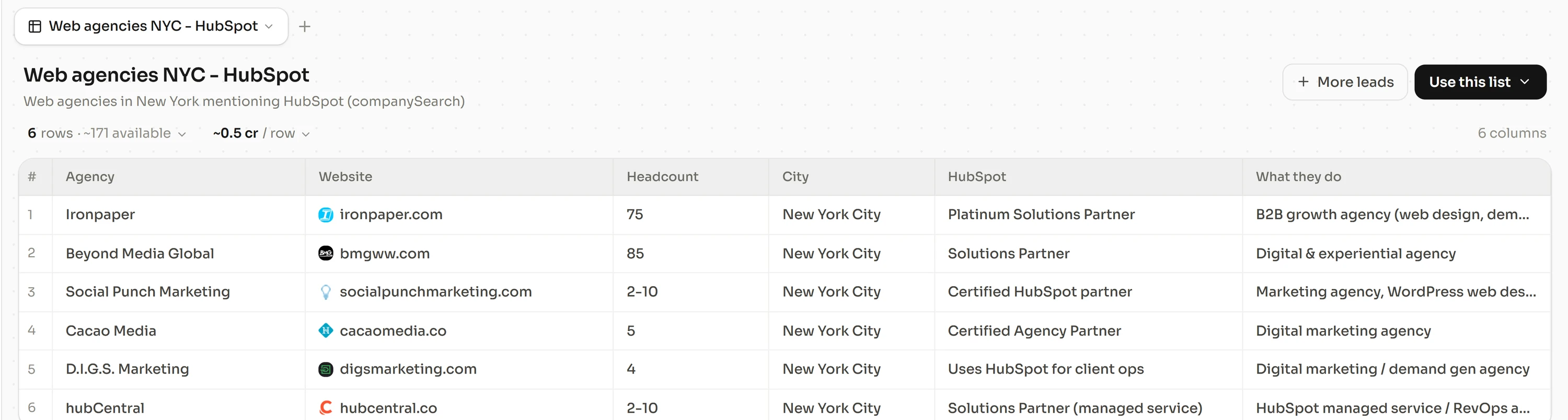
It then enriches every row with verified contacts through provider waterfalls, 18 for email and 12 for phone. The waterfalls find and verify more than 92% of emails and find more than 90% of phone numbers. A row that fails verification is never delivered and never billed, so an unverified file never reaches a rep's sequence. Search, enrichment and sequencing sit in one thread.
For sales and revenue leaders, that puts the whole team on one verified source instead of a list per rep. The sequencer sends from each rep's own Google or Microsoft mailbox, with unlimited sending and unlimited team members. Plans start at €49 a month for 1,500 credits, monthly with no lock-in. Free 7-day trial, no credit card, at freelvy.com.
How we verified this
Google's email sender guidelines and sender guidelines FAQ, Yahoo's Sender Hub best practices, Microsoft's Outlook announcement on requirements for high-volume senders and Amazon SES documentation on sending review were read on October 4, 2026. The 240-message illustration is our own arithmetic.
FAQ
Why are all our cold emails suddenly going to spam?
Usually because the shared domain's reputation dropped. Mailbox providers judge the domain, so one bad list or one sequence that draws complaints affects every mailbox on it. Check the bounce rate by list and the spam rate in Google Postmaster Tools first, before changing any template or sending tool.
Should we stop sending cold email while we fix it?
Yes, pause the cold sequences on the affected domain. Every message sent into a damaged reputation adds negative signal. Keep replies and transactional mail running, because recipients who want that mail send the positive engagement a recovering domain needs. Restart only once bounces and complaints are back under the published lines.
What bounce rate is too high for cold email?
Mailbox providers do not publish a single number. Sending platforms do publish account rules. Amazon SES documentation places an account under review at a 5 percent bounce rate and may pause it at 10 percent, as of October 4, 2026. Filters react earlier, so verify every list before any mailbox sends to it.
Does one rep's bad list affect the whole team?
Yes, when the team shares a sending domain. Google counts all mail from the same primary domain together, subdomains included. Bounces and complaints from one rep's campaign lower the reputation every other mailbox on that domain depends on. Verify every list centrally and share one suppression list across the team.
How long does it take to recover domain reputation?
No provider publishes a timeline. Google's one published clock is its mitigation rule, which requires a spam rate below 0.30 percent for seven consecutive days before a bulk sender becomes eligible again. Plan for several weeks of reduced volume and treat the restart as a new warmup.
Will a new domain fix spam placement?
Only if the cause goes with it. A new domain sent the same unverified lists at the same volume will land in spam too, and providers can see when domains are related. Repair the list and the volume cap first. Then add authenticated, warmed domains if the team needs more capacity.
Sources and methodology
All pages below were read on October 4, 2026. Figures are attributed in the text to the pages that published them. The 240-message illustration is our own calculation.
- support.google.com, answer 81126
- support.google.com, answer 14229414
- senders.yahooinc.com, best practices
- techcommunity.microsoft.com, strengthening email ecosystem outlook's new requirements for high volume senders 4399730
- docs.aws.amazon.com, ses latest dg faqs enforcement